
Imagine the sudden, hollow silence when a drive that holds a decade of milestones fails to spin. You realize your wedding portraits, your child’s first steps, and every irreplaceable sunset are locked behind a cold piece of metal. This moment of panic often leads to desperate measures, yet the choice to recover photos from damaged hard drive hardware is one that requires patience, precision, and technical grace. Your history isn’t just a collection of bits. It’s a legacy that deserves a meticulous approach.
It’s natural to feel overwhelmed by technical jargon or the fear that one wrong click will erase your history forever. You deserve a clear, authoritative path back to your memories that prioritizes the integrity of your data over quick, risky fixes. This guide will help you diagnose, preserve, and restore your files by distinguishing between physical and logical failures. We’ll explore the professional protocols required to safeguard your visual narrative so you can move forward with absolute peace of mind.
Key Takeaways
- Learn why immediately disconnecting power is the most vital step in preventing irreversible mechanical degradation of your storage media.
- Distinguish between logical file corruption and physical hardware failure by identifying the subtle sensory warnings that signal a drive is in distress.
- Discover the professional protocols to recover photos from damaged hard drive systems using non-invasive, read-only scanning methods.
- Identify the critical threshold where DIY attempts should cease in favor of forensic-grade imaging and specialized Clean Room recovery environments.
- Implement the 3-2-1 backup strategy to transform a recovered collection into a resilient, permanent digital archive for your family history.
The First Response: Immediate Actions for a Damaged Drive
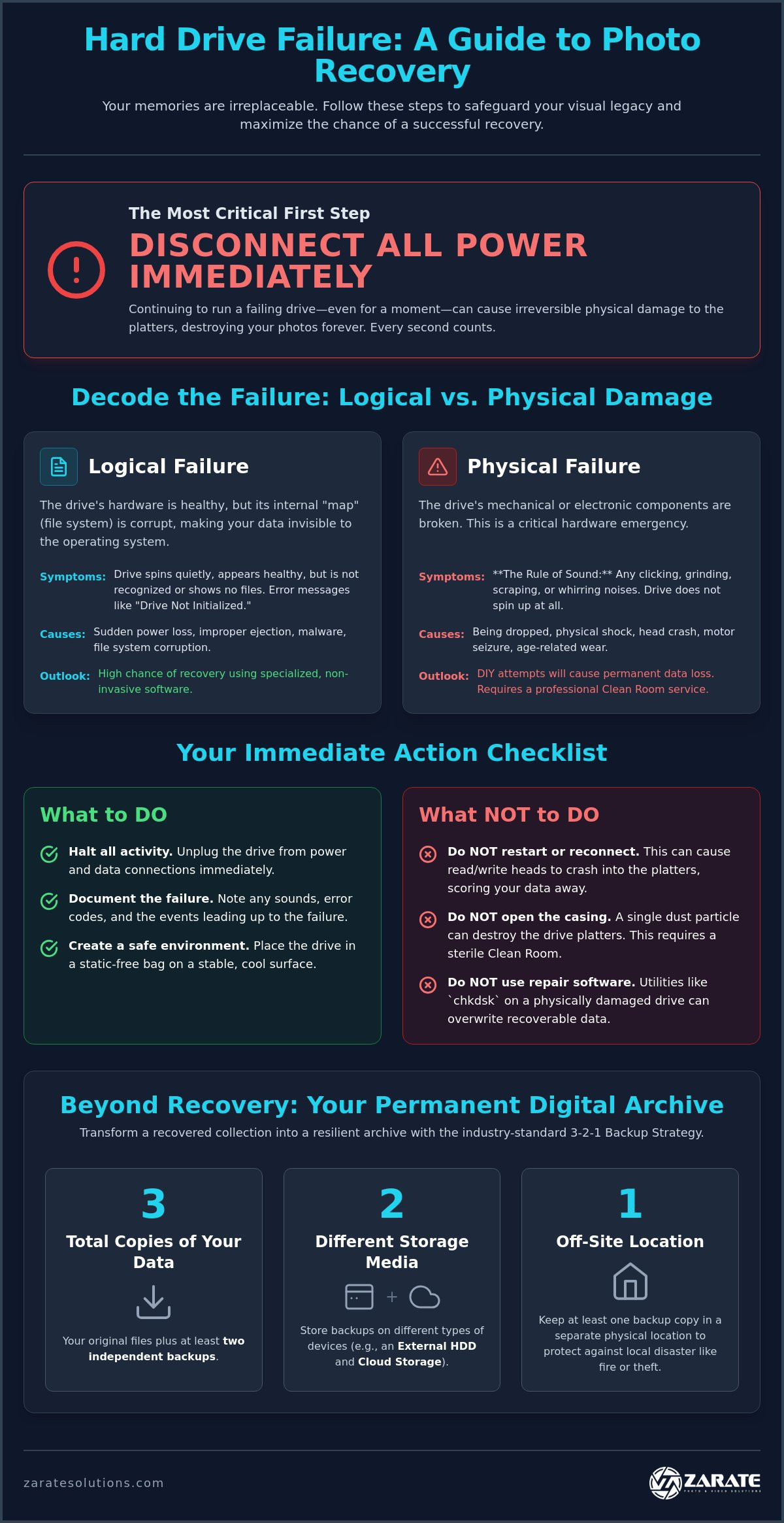
Silence is your most powerful ally. When a storage device fails, the instinct to restart, refresh, or reconnect is overwhelming. However, the path to recover photos from damaged hard drive hardware begins with a single, decisive act: total cessation of power. Every rotation of a compromised platter or every failed boot cycle represents a gamble with your history. You must stop, breathe, and disconnect. By removing the device from its host computer, you halt the background processes that silently overwrite headers or degrade mechanical components. This immediate triage is the most critical step in preserving your visual legacy.
Once the drive is quiet, your role shifts from user to archivist. Document the exact circumstances of the failure with meticulous detail. Did the drive emit a rhythmic clicking, a sharp grinding, or a faint beep? Note any specific error codes provided by your operating system, such as “Drive Not Initialized” or “I/O Device Error.” Resist any urge to shake the device or dismantle the outer casing. These drives are assembled in sterile environments; exposing the internal platters to a single speck of household dust can render modern data recovery techniques ineffective. Your goal is to stabilize the situation, maintain the drive’s physical integrity, and prepare for a professional assessment.
Why Powering Down is Non-Negotiable
The internal architecture of a hard drive is a marvel of precision, where read/write heads hover mere nanometers above spinning magnetic platters. When a drive is physically damaged, these heads can drop and physically score the surface, carving permanent trenches through your data. Continuous power also forces the drive to attempt “re-tries,” which can generate intense thermal stress and warp delicate internal components. Furthermore, failed boot cycles often result in the system attempting to “repair” the file system, which inadvertently overwrites the very file headers required to recover photos from damaged hard drive sectors. Powering down ensures that the current state of your data is frozen in time, protected from further mechanical or logical erosion.
Creating a Safe Diagnostic Environment
While the drive is disconnected, place it in a secure, static-free environment. Avoid resting the device on carpets, blankets, or electronic equipment that generates heat. Extreme temperatures are particularly hazardous; they can cause the lubricants within the motor to thicken or the platters to expand, complicating the retrieval process. Use this time to gather essential technical specifications, including the drive’s manufacturer, model number, and total storage capacity. Having this information ready allows for a more sophisticated and tailored recovery plan, ensuring that the experts handling your memories understand the specific hardware limitations they must navigate.
Decoding the Failure: Logical Issues vs. Physical Damage
Identifying the specific nature of a drive’s distress is the first step toward a successful resolution. You must distinguish between logical errors, where the data is intact but hidden, and physical trauma, where the hardware itself has failed. To recover photos from damaged hard drive units, you have to listen, observe, and evaluate the symptoms with clinical precision. A “Drive Not Recognized” message can be terrifying, yet its meaning changes entirely based on how the drive behaves physically. If the computer fails to see the drive but it spins smoothly, the issue is likely a software-based hurdle that can be cleared with the right tools.
Logical Corruption: When the Software Fails
Logical failure occurs when the drive’s physical components are healthy, yet the operating system cannot locate your files. This often stems from improper device ejection, sudden power loss, or malware interference. At the heart of this issue is usually the Master File Table (MFT). This component acts as the drive’s internal map, and when it’s corrupted, your photos become invisible to the computer. The MFT stores the metadata for every file on an NTFS volume, including names, timestamps, and locations. These scenarios are often the most forgiving, and they allow for a structured backup and restore plan to be implemented once the immediate crisis is resolved.
Physical Catastrophe: When the Hardware Breaks
Physical damage is a far more visceral and dangerous threat. If your drive emits clicking, grinding, or whirring sounds, it has entered a state of mechanical failure. This is the “Rule of Sound”: a noisy drive is a dying drive. Internal components like the read-write heads may have crashed into the platters, or the motor might have seized entirely. You may notice several warning signs:
- Rhythmic clicking, often called the “click of death”
- High-pitched grinding or scraping sounds
- A complete lack of vibration or heat from the enclosure
Electronic failure often presents as a drive that is completely unresponsive. There are no sounds, no vibrations, and no lights. This usually indicates a power surge has damaged the Printed Circuit Board (PCB), requiring a precise component-level repair. Opening a drive outside of a certified Clean Room is a terminal mistake. Microscopic particles will instantly destroy the magnetic surface, making it impossible to recover photos from damaged hard drive platters. If the complexity of a physical failure feels daunting, partnering with a bespoke data recovery specialist provides the security, precision, and high-end craftsmanship your memories deserve.
Navigating Software Recovery: A Cautious Professional Approach
Success depends on non-interference. When you choose to recover photos from damaged hard drive partitions using software, you must adopt the mindset of a forensic professional. The golden rule of data retrieval is simple: never write anything to the source drive. Installing recovery tools, saving temporary files, or even browsing the web on the affected system can overwrite the very sectors you are trying to save. Always download and install your chosen utility onto a separate, healthy computer or an external drive. This ensures the integrity of your visual legacy remains uncompromised by accidental data overlap.
Selecting the right tool requires discernment, authority, and research. Reputable options like EaseUS Data Recovery Wizard have reported success rates as high as 99.7% in 2026, while free tools like Recuva offer a starting point for simpler deletions. However, understanding the data recovery process means recognizing that software is only effective for logical failures. Professional-grade software should always operate in a “Read-Only” mode. This setting scans the drive without making any alterations, protecting the magnetic surface from the unnecessary stress of write operations during the retrieval attempt.
The Risks of DIY Software
Software is a double-edged sword. Intensive deep scans are mechanically taxing, and they can finalize the death of a drive that is already physically weak. If you notice the scan speed dropping to a crawl or hear new clicking sounds, stop immediately. Many “trial” versions of software are designed for marketing rather than forensic integrity. For instance, while some free tools recovered 74% of files in simple deletion tests, they dropped to 41% success in quick format scenarios according to June 2026 testing. If the software scan seems to be going nowhere, it’s a sign that the failure is deeper than code alone.
Step-by-Step Logical Retrieval
Focus your efforts on a non-destructive scan of the file system. Modern recovery tools allow you to filter results by file signature, which is essential for photographers dealing with vast archives. Search specifically for high-fidelity formats like .JPEG, .RAW, or .HEIC to isolate your memories from system junk. Once the scan is complete, meticulously verify the integrity of the recovered photo thumbnails. If the previews appear fractured, grayed out, or distorted, the file headers may be damaged. Always save these recovered assets to a secondary, healthy storage device to ensure your restored history is immediately secured, protected, and ready for archival.
The Case for Expert Recovery: Preserving Irreplaceable Legacies
The moment of transition arrives when technical barriers exceed your comfort or the drive’s physical stability. While software offers a solution for simple corruption, it cannot mend a broken motor or a crashed head. To recover photos from damaged hard drive units that exhibit mechanical distress, you must rely on a controlled, forensic approach. This is the point where your role as a guardian of memories shifts toward seeking a partner who values your history as much as you do. Professional intervention isn’t just about file retrieval; it’s about the security, integrity, and honor of your personal narrative.
Clean Room environments provide the necessary sanctuary for this delicate work. These sterile spaces filter out microscopic contaminants that would otherwise destroy the magnetic platters the moment the casing is opened. By choosing an expert service, you gain access to specialized tools that can stabilize a failing drive, replace damaged components, and extract data that consumer-grade utilities simply cannot reach. This level of care reflects a commitment to quality over quantity, ensuring that every possible bit of your history is meticulously accounted for and protected.
Forensic Imaging: The Gold Standard
Professional recovery begins with the creation of a bit-by-bit clone of the failing device. This forensic image captures every sector, allowing the archivist to work on a digital duplicate rather than the fragile original. Consumer software often crashes when it encounters bad sectors, but specialized hardware can skip, re-read, or bypass these hurdles with surgical precision. This methodology protects the original hardware from the thermal and mechanical stress of repeated read attempts, ensuring that the primary source remains as stable as possible throughout the process. It’s a methodical, deliberate, and secure way to recover photos from damaged hard drive sectors without risking further degradation.
The Value of Personal History
Certain milestones are entirely irreplaceable. A wedding, a quinceañera, or a newborn’s first days represent chapters in a family’s story that cannot be re-shot or recreated. When you reflect on the artistry and detail found in customizable wedding photography packages, it becomes clear that these images are high-stakes assets. They deserve a recovery process that matches their original craftsmanship. Investing in an elite service provider ensures your visual legacy is handled with the quiet confidence and technical mastery required to bring those moments back to life. For those facing the devastating prospect of lost nuptial imagery, our dedicated guide to wedding photo recovery outlines the precise steps and professional methodologies available to restore these irreplaceable memories.
At Zarate Photo & Video Solutions, we serve as innovators in visual quality and traditionalists in preservation. Our approach is tailored, methodical, and deeply invested in your unique requirements. If you’re facing a drive failure that feels too risky for DIY attempts, it’s time to choose a professional path. Secure your legacy today by exploring our bespoke data recovery services.
Beyond Recovery: Architecting Your Permanent Digital Archive
The relief of a successful retrieval is profound, yet the journey doesn’t end with a restored folder. A successful attempt to recover photos from damaged hard drive hardware should serve as a definitive catalyst for a more resilient future. You’ve witnessed the fragility of a single point of failure. Now, you must architect a system that ensures your family’s visual history is never again held hostage by a mechanical whim or an electronic surge. Moving from a state of crisis to a state of preservation requires a methodical, professional, and forward-thinking strategy.
Cloud storage is a sophisticated secondary layer, but it shouldn’t be your primary archive. It serves as a vital fail-safe against local disasters like fire or theft, yet it lacks the tactile security and long-term control of physical media. True archival excellence involves periodic health checks for your hardware. External drives and SSDs are tools with finite lifespans; replacing them every three to five years is a small price to pay for the continued safety of your legacy. This proactive approach transforms your collection from a vulnerable set of files into a curated, enduring narrative.
The 3-2-1 Backup Strategy
This industry standard provides a tripartite layer of security that is simple yet unshakeable. You should maintain three copies of your data, stored on two different types of media, with one copy kept in a separate geographic location. For instance, you might keep your primary archive on a high-capacity HDD, a secondary clone on a durable SSD, and a third copy in an encrypted cloud service. High-capacity HDDs are excellent for cold storage, while SSDs offer the speed and physical resilience required for active browsing. Automating this process is essential. It removes the risk of human error and ensures that every new memory is instantly protected without your direct intervention.
Zarate as Your Meticulous Archivist
At Zarate Photo & Video Solutions, our commitment to your history extends far beyond the technical act to recover photos from damaged hard drive sectors. We operate as bespoke storytellers and meticulous archivists who understand the emotional weight of every frame. Our suite of services is designed to integrate your newly recovered digital files with our specialized analog-to-digital media conversion offerings. This holistic approach ensures that your entire history, from vintage film to modern digital captures, is unified in a single, high-definition archive.
We don’t just return your data; we help you organize, protect, and celebrate it. By transitioning from temporary storage to a bespoke digital legacy, you gain the peace of mind that comes from professional-grade craftsmanship. Your past is a collection of milestones that deserve more than just a second chance. They deserve a permanent home built on technical authority and artistic respect. Let us help you safeguard the moments that matter most, ensuring they remain vibrant for generations to come.
Protecting Your Visual Legacy for Generations
Your history is far too precious to be left to chance. By understanding how to recover photos from damaged hard drive systems through diagnostic precision, stabilized environments, and professional triage, you’ve taken the essential first step toward total preservation. Whether you’re addressing a minor logical corruption or navigating the high-stakes complexities of a mechanical failure, the priority remains the same: the absolute security of your life’s work. A drive may be temporary, but the milestones it holds are meant to be eternal.
Zarate Photo & Video Solutions provides national coverage for high-stakes media preservation, offering a sophisticated blend of bespoke storytelling and meticulous archival expertise. We maintain deep expertise in both modern digital file systems and legacy analog formats, ensuring that every chapter of your personal narrative is treated with the highest level of craftsmanship. Secure Your Memories with Zarate’s Professional Data Recovery Services to ensure your legacy is thoroughly protected, expertly restored, and beautifully celebrated. Your past is a treasure that deserves a secure future. We are here to guide you home.
Frequently Asked Questions
Can I recover photos from a hard drive that won’t turn on?
Yes, recovery is possible, but it typically requires professional intervention to address electronic or mechanical failures. If a drive fails to receive power, the issue often resides in a damaged Printed Circuit Board (PCB) or a seized spindle motor. Professionals can perform component-level repairs or platter transplants in sterile environments, ensuring your memories are extracted with the precision, care, and technical authority they deserve.
How much does professional photo recovery typically cost?
The investment for professional recovery is determined by the complexity of the failure and the meticulous labor required for restoration. Logical recoveries involving software corruption are generally less intensive, while physical repairs requiring clean room access and donor components represent a more significant undertaking. Each project is handled as a bespoke archival service, prioritizing the security, integrity, and lasting value of your irreplaceable personal history.
Is it safe to use free data recovery software found online?
Reputable free software is safe for simple logical issues, such as accidental deletion, provided the drive is physically healthy. However, using online tools on a failing drive can be hazardous. Many programs lack forensic integrity and may inadvertently overwrite your data. To safely recover photos from damaged hard drive sectors, always verify the software is non-invasive and operates in a strict read-only capacity.
What is the difference between a head crash and a logical error?
A head crash is a mechanical catastrophe, whereas a logical error is a software-based disruption. In a head crash, the physical read-write arm contacts the spinning platter, creating permanent damage to the magnetic surface. Logical errors involve corrupted file tables or accidental formatting where the hardware remains pristine. Distinguishing between these states is vital, as physical failures require a clean room, while logical issues demand forensic software expertise.
How long does the professional data recovery process take?
The duration of the recovery process typically spans from a few business days to several weeks. This timeline is influenced by the drive’s total capacity, the severity of the damage, and the precision required to stabilize the hardware. Meticulous archival work cannot be rushed, as a steady and deliberate pace ensures the highest success rate for preserving your most cherished wedding photo recovery and family milestones.
Can photos be recovered if the hard drive was physically dropped?
Yes, photos can often be retrieved from dropped drives, provided the device is not powered on after the impact. A fall can cause the read-write heads to misalign or the platters to shatter, making any further rotation extremely dangerous. By keeping the drive dormant, you prevent the heads from carving into the magnetic coating, allowing a professional archivist to assess, stabilize, and restore your visual legacy.
What should I do if my hard drive starts making a clicking sound?
Immediately disconnect the power and cease all attempts to access the files. A clicking sound indicates a mechanical struggle, often involving the read-write heads failing to find their position. Continuing to provide power allows the hardware to degrade further, potentially turning a recoverable situation into a permanent loss. Professional guidance is essential to safely recover photos from damaged hard drive components exhibiting these rhythmic warning signs.
Does data recovery work for SSDs as well as traditional HDDs?
Data recovery is highly effective for SSDs, though the process utilizes distinct forensic methodologies compared to traditional HDDs. While SSDs lack moving parts, they are susceptible to controller failure, firmware corruption, and electronic wear. Professionals use advanced techniques to bypass the controller and read the flash memory chips directly, reconstructing your digital archive with the same level of sophistication, respect, and technical mastery used for mechanical drives.