
Description
Relive Your Memories
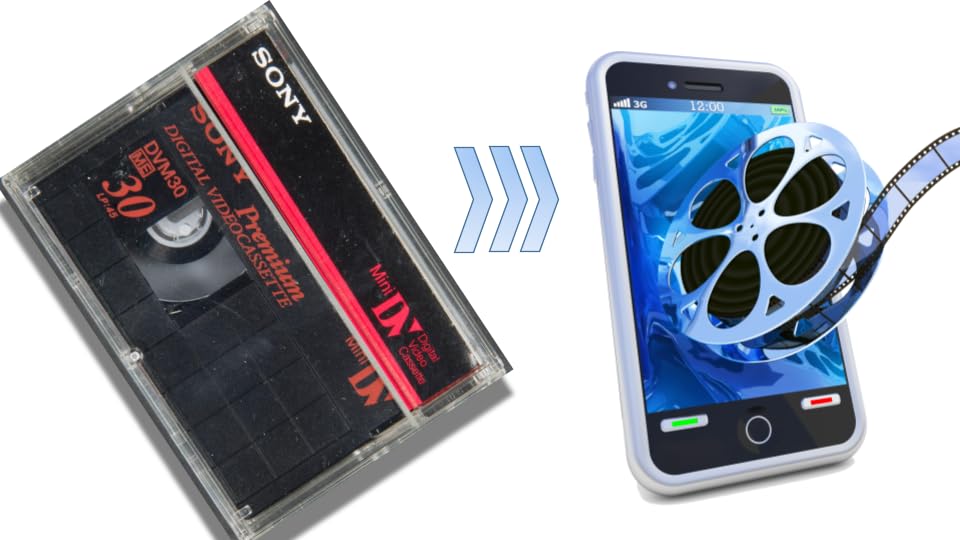
Do you have a box of old MiniDV tapes sitting in a closet, gathering dust? Those precious family vacations, birthday parties, and holiday gatherings are trapped on an obsolete format. Worse, magnetic tape degrades over time. At Zarate Photo & Video Solutions, we resurrect into your old footage by converting your MiniDV tapes into high-quality, modern digital video files that you can watch, share, and preserve forever.
What is a MiniDV Tape?
Introduced in the mid-1990s, the MiniDV (Mini Digital Video) tape was the go-to format for the generation of digital camcorders. While it was a massive leap forward from bulky VHS tapes, MiniDV is still a physical, magnetic tape format. Because it requires a specific, functioning camcorder or digital VTR deck and FireWire cables to play back, accessing your footage today has become nearly impossible without the right legacy equipment.
Why Convert Your MiniDV Tapes to Digital
- The Clock is Ticking: Magnetic tape naturally degrades over 10 to 20 years, leading to signal loss, color fading, and tape brittleness. Digitizing now ensures your memories aren’t lost forever.
-
Universal Playback: Watch your videos instantly on your smartphone, tablet, computer, or Smart TV.
-
Safe from Physical Damage: Digital files don’t suffer from mold, humidity, heat damage, or tape snaps.
-
Easy Sharing: Instantly send videos to family members via email, cloud links (Google Drive/Dropbox), or social media.
-
Seamless Editing: Want to make a highlight reel for an anniversary? Digital files are ready to drag and drop into any modern video editing software.
Choose Your Perfect Digital Format
We don’t believe in a one-size-fits-all approach. We convert your MiniDV tapes into the exact format that fits your needs. Our robust conversion software supports an extensive library of video containers and codecs. We handle everything from universally accepted modern formats to legacy extensions and professional editing wrappers.
1. Mainstream & Web-Standard Formats
-
MP4 (
.mp4) – The undisputed global standard. Highly efficient compression with near-universal compatibility across smartphones, tablets, computers, and streaming platforms like YouTube and Facebook. -
WebM (
.webm) – Sponsored by Google, this open-source, royalty-free format is highly optimized for modern web browsers, offering minimal buffering and excellent HTML5 web integration. -
M4V (
.m4v) – Developed by Apple for iTunes, this container is highly similar to MP4 but specifically optimized for Apple ecosystems (and occasionally includes DRM copy protection).
2. High-Fidelity & Professional Editing Formats
-
MOV (
.mov,.qt) – Apple’s native QuickTime format. It stores exceptionally high-quality video, audio, and effects data, making it the preferred choice for professional video editors and studio workflows. -
MKV (
.mkv) – The Matroska Multimedia Container. An open-source powerhouse capable of holding an infinite number of video, audio, picture, and subtitle tracks within a single file. Highly future-proof. -
AVI (
.avi) – Audio Video Interleave by Microsoft. One of the oldest digital video formats, it uses less compression to offer immense structural fidelity, though it results in significantly larger file sizes.
3. Legacy & Broadcast Formats
-
WMV (
.wmv) – Windows Media Video. Tailored specifically for Windows Media Player and legacy streaming frameworks, offering decent video quality in highly compact file sizes. -
MPEG / MPG (
.mpeg,.mpg,.mp2,.mpe,.mpv) – Traditional formats utilizing MPEG-1 or MPEG-2 standards.Commonly found in vintage digital media, over-the-air broadcasting, and legacy DVD video structures. -
FLV / F4V (
.flv,.f4v) – Flash Video formats. Though Adobe Flash player has been retired, these containers are still converted frequently to rescue older web animations and early internet video archives.
4. Camcorder & Mobile Specialties
-
AVCHD / MTS (
.mts,.m2ts) – Advanced Video Coding High Definition. Developed jointly by Sony and Panasonic, this format is used by digital camcorders to capture highly detailed 1080p and 3D footage. -
3GP / 3G2 (
.3gp,.3g2) – Created by the 3rd Generation Partnership Project, these highly compressed formats are tailored for older 3G mobile networks to conserve strict data and hardware limits.
Our Step-by-Step Conversion Process
We treat your irreplaceable memories with the highest level of care, utilizing a precise, multi-step preservation process:
-
Inspection & Prep: We carefully inspect each MiniDV tape for physical damage, dirt, or mold. If a tape needs a minor cleaning, we handle it before playback.
-
Studio-Grade Playback: Your tapes are played on professional-grade Sony DVCAM decks, optimized for the cleanest possible signal output.
-
Lossless Time-Base Correction (TBC): We use hardware stabilizers to eliminate screen jitter, fix tracking issues, and ensure audio-to-video synchronization.
-
Digital Capture & Quality Check: The footage is captured in real-time. Our technicians monitor the transfer to ensure optimal brightness, contrast, and audio levels.
-
Delivery: Your new digital files are loaded onto your chosen media (USB/Online Gallery), and your original tapes are safely returned to you entirely unharmed.
Why Choose Zarate Photo & Video Solutions
-
Safe Hands Guarantee: We know your tapes are priceless. Every order is tracked from the moment it arrives at our secure facility to the moment it ships back to you.
-
True 1:1 Quality: We don’t use cheap, consumer-grade USB capture sticks. We use high-end broadcast equipment to extract every pixel of quality your camcorder originally recorded.
-
No Hidden Fees: Our pricing is transparent—per tape, with no surprise upcharges for tape length.
-
Proudly Local & Experienced: Our team consists of media preservation experts who have digitized thousands of hours of family history.

There are no reviews yet.